Check your pack is genuine查验您的产品是否为正品Semak sama ada pek anda tulen
Every official pack has an anti-counterfeit QR code. Checking takes a minute.每盒官方产品都有防伪二维码,只需一分钟即可查验。Setiap pek rasmi mempunyai kod QR anti-pemalsuan. Semakan hanya mengambil masa seminit.
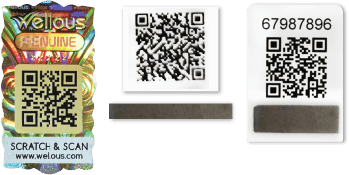
Find the QR code on the back of the pack在产品背面找到二维码Cari kod QR di belakang pek
There are three types of QR code.二维码共有三种类型。Terdapat tiga jenis kod QR.
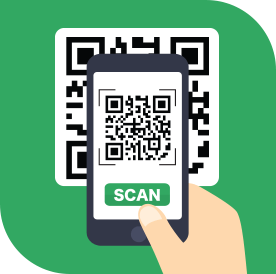
Scan it with your phone camera用手机相机扫描Imbas dengan kamera telefon anda
The brand’s own page opens. No app needed.品牌的官方页面会自动打开,无需下载应用。Halaman jenama akan dibuka. Tiada aplikasi diperlukan.

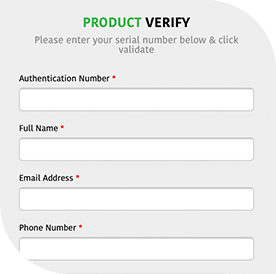
Key in the security code输入安全码Masukkan kod keselamatan
Before you start开始前请注意Sebelum anda mulaOnly 3 attempt(s) are allowed to run QR Scan.二维码扫描最多只能进行 3 次。Imbasan QR hanya dibenarkan sebanyak 3 kali.
Key in security code - Only 1 attempt is given for code verification.输入安全码:验证只有 1 次机会。Masukkan kod keselamatan: hanya 1 cubaan diberikan untuk pengesahan kod.Read the result查看结果Baca keputusan

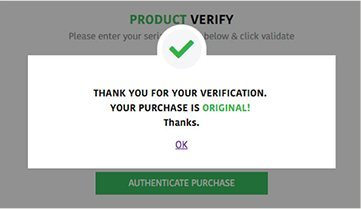
This message box will appear if your purchase is original.如果您购买的是原装正品,将会显示此信息框。Kotak mesej ini akan dipaparkan jika pembelian anda asli. 
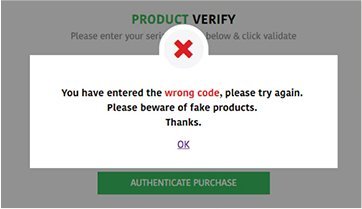
This message box will appear if your purchase is fake or if you entered the wrong numbers.如果您购买的是假货,或输入了错误的号码,将会显示此信息框。Kotak mesej ini akan dipaparkan jika pembelian anda palsu atau jika anda memasukkan nombor yang salah. Says fake, or stuck?显示假货或遇到问题?Keputusan palsu atau tersekat?
Chat with us. A real person will help, 24/7.联系我们,真人客服全天候协助您。Sembang dengan kami. Orang sebenar akan membantu, 24/7.
Chat with us on Messenger在 Messenger 与我们聊天Sembang dengan kami di Messenger
Shop genuine packs选购正品Beli pek tulen
Every pack in this store is official stock.本店每一盒都是官方正品。Setiap pek di kedai ini adalah stok rasmi.
Back to the shop返回商店Kembali ke kedaiQuestions? Chat with us 24/7有疑问?全天候联系客服Ada soalan? Sembang dengan kami 24/7